Intro
Last October, my post “Why I Ditched Disqus for My Blog” unexpectedly reached the #1 spot on Hacker News - and stayed on the front page for more than 11 hours. Overnight, a blog I usually run quietly from an old laptop-turned-server at home was under the kind of scrutiny I never prepared for. For context, a couple of years ago, I migrated from Ghost to Hugo, and started self-hosting in a truly DIY way - a setup that could reliably handle my modest regular traffic. But handling tens of thousands of readers in a day or two? That was brand-new territory…
Cloudflare CDN
Can I really call it self-hosting if I’m using a CDN?
YES, of course I can! Using a CDN to speed up distribution doesn’t change the fact that I own and manage the origin server where my blog content is located. In this day and age, it’s wacky not to use a CDN to reduce bandwidth pressures on your own hardware.
I’m lucky to have a 1GB (symmetrical) Fibre connection to my property, which means I possibly wouldn’t need a CDN. However, I love the 1GB line speed, and in instances where a lot of people are browsing my blog, this would mean other internet-connected devices in my home could slow down.
NGINX telling Cloudflare what to Cache
You could stick a CDN in front of your origin server, and be done with it. However, with a CDN there’s 2 tiers of caching you need to think about:
- CDN Cache - how long the CDN caches the content
- Browser Cache - how long the browser caches the content
#2 - without setting this, the browser will always go to the server to get a new copy of the content. Every, single, time.
#1 requires a bit more thought, this is how long the CDN caches the content for. If you choose 100 days on the CDN and 5 days on the Browser cache. Then if someone is accessing your content every day. Every 5th day their browser will ask the CDN for the content again. Only after the 100 days are up, will Cloudflare return to your origin to request the page again.
I want to choose different cache policies for different files/content. After hugo builds my blog and outputs the html files, I use NGINX to serve my static blog content. The posts on my blog typically don’t change after they’re published, which means I can add caching headers to my static files to tell your browser and Cloudflare what to cache.
Below is an example of some caching headers I’ve added to my static files:
location ~ ^(?!\/index.html).+$ {
    # root of the site starts with "/index.html", anything that doesn't start with that,
    # and doesn't match any other locations above, must be a blog post page, so cache it
    # 20 day browser cache
    add_header Cache-Control "public, max-age=1728000";
    # 100 day cdn cache
    add_header CDN-Cache-Control "public, max-age=8640000";
}
I’ve got different rules for your browser, and different rules for Cloudflare. This allows me to cache blog posts for 20 days in the browser (so your browser won’t have to download them from Cloudflare again). And also I’ve set Cloudflare to cache blog posts for 100 days (so that Cloudflare doesn’t have to download them from my origin server again).
This keeps a lot of traffic away from my origin server. Cloudflare being a CDN helps ensure my blog posts are served ultra-fast from an edge location too.
The index.html is cached separately, as the main page is just a list of my blog posts, this needs to be removed from cache when I release a new post.
I use the following script (as part of my GitHub Actions workflow) to remove the index.html (and some static files from) from cache:
#!/bin/bash

echo "Purging Cloudflare Cache"

curl -X POST "https://api.cloudflare.com/client/v4/zones/MY_ZONE_ID/purge_cache" \
-H "Authorization: Bearer $1" \
-H "Content-Type: application/json" \
--data '{"files":[
"https://ryansouthgate.com/",
"https://ryansouthgate.com/rss",
"https://ryansouthgate.com/index.xml",
"https://ryansouthgate.com/index.json"]}'

echo "Completed Purge"
Architecture Recap: Ghost ➔ Hugo and Self-hosting on a Laptop
My usual traffic hovers around 14-15k unique visitors per month (as reported by CloudFlare) - nothing my Linux laptop (more details here: Old Laptop = New Web Server) can’t handle. Running Hugo and serving via NGINX made serving static content easy and cheap, and self-hosting meant full control, privacy, and (usually) peace of mind. I run Cloudflared to tunnel my origin server to Cloudflare, so I’m not exposing my origin server to the internet. Which would mean that, without the CDN layer, I would be serving traffic from my origin server - which would negatively impact my internet speeds in my house.
The Surge: Hacker News, Traffic Stats and Analytics
Here’s what a normal month looked like: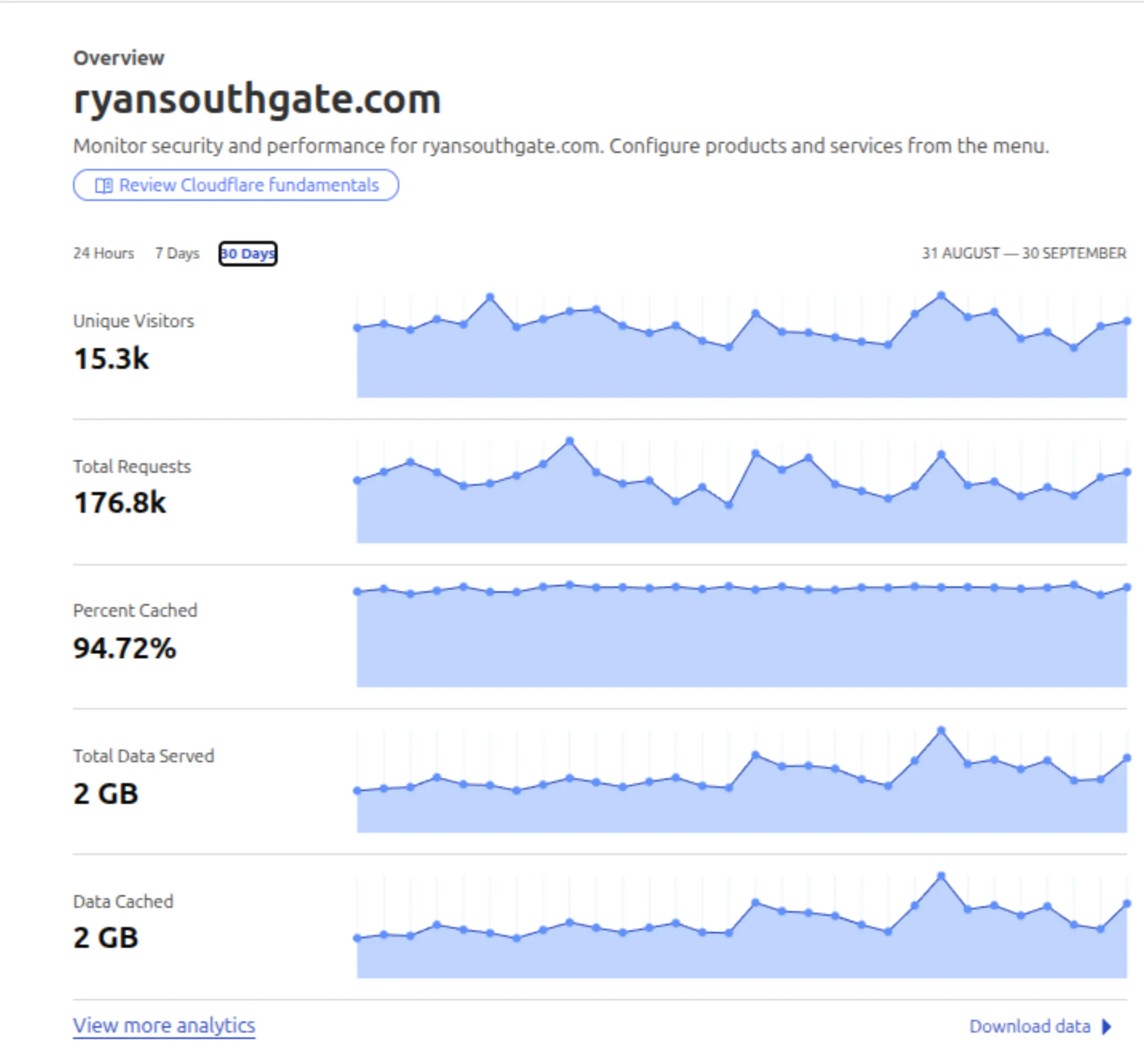
We can see from 15.3k unique visitors and a 94.7% cache hit rate that most requests were served from Cloudflare. The 2GB Total Data Served and 2GB Data Cached show us that Cloudflare is also doing the heavy lifting in terms of traffic too.
But after the post was submitted to Hacker News, the surge started.
I’d never seen anything like this in my analytics. 70,000+ unique visitors, and a wild spike for data out. The Hacker News thread exploded into a thoughtful discussion about comment systems, privacy, and even self-hosting. Here’s what my Cloudflare dashboard looked like during the surge: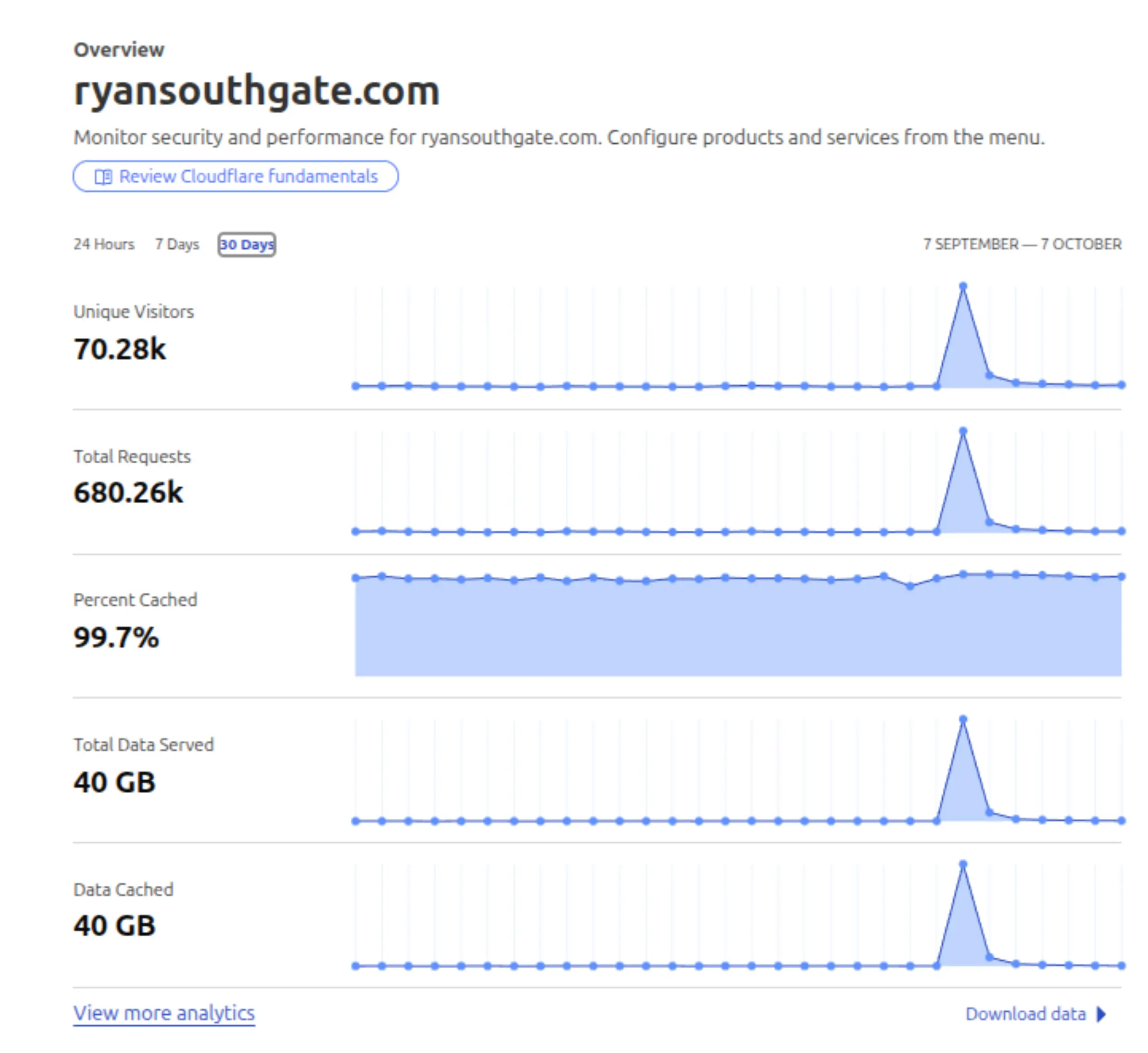
From that view of the dashboard (after it all died down somewhat), we can see the massive spike in traffic on the day of the submission to Hacker News. The cache rate actually increased to 99.7%. And the data metrics also soared to 40GB. Showing that Cloudflare was still doing most of the work and making sure as little traffic as possible was hitting my origin. Not bad for a free service!
The aftermath
I spent a large amount of time reading some of the thoughtful comments on the Hacker News thread, it seems like a lot of the community had come across this issue before, and had just nuked Disqus from their blogs.
A member from the Disqus team reached out to me via email, saying they’d seen the blog post. The email suggested trying out Disqus Pro ($11/month) and felt like a shakedown - throw some money our way, and the problem will disappear. The sender also acknowledged the issue and thanked me for “bringing light to this issue” - however, made no indication that they’re wanting to change, or that something is being fixed behind the scenes. It lacked ownership and action.
I didn’t respond as I’m not prepared to waste my time on Disqus anymore, they’ve burnt that bridge.
Closing
The blog post certainly struck a chord with the community; I think there’s a lot of resentment to the perceived “bait-and-switch” (free tier) from Disqus.
I’d hope Disqus can learn from some of the feedback on the Hacker News thread, and make changes to improve the user experience for self-hosters and privacy-conscious users. But at the end of the day, after a buyout from Zeta Global - those folks are going to want some return on their cash - and scammy ads must be bringing some money in.
In terms of self-hosting, it’s amazing what you can do with an old laptop, and Cloudflare CDN. I hope this free tier remains free, as it allows me to continue running my blog (through these rare traffic spikes), move traffic away from my origin server, and keep the blog online when traffic does wildly increase 🙂